I’ve been toying around with tools for the past 5 years now.
First, during my 9–5, I used lots of scheduling tools that made life easier, so I don’t have to chronically be online. I was cheating on my job… but I couldn’t make it so obvious.
So I scheduled tweets that fuelled sales for me back then.
Now, everything has changed.
Twitter isn’t there anymore, AI is a thing (no matter how hard you try to run away from it), and I’ve never been so grateful to live the 3-hour workdays as with a 5.5-month-old. It’s become so much easier to continue working.
I created the 3-hour workday out of laziness.
But now… I’m genuinely so short on time. So it's working even better.
Here are 4 tools that are making life easier.
I’ve been using it for 4 now.
One of my workflows is
- free newsletter + free email course
- weekly newsletter
- products and courses plugged in
This results in an audience that consistently gets value from me and eventually trusts me enough to hit the buy button. And even if they don’t buy from me, that’s okay, as long as they keep reading because it means I’m adding value to them.
I haven’t seen anything as powerful as Kit because I can literally send an email sequence to all those who even click on a particular link.
There’s a reason the best creators in the world use it :)
2/ Claude — Chat and Co-Work
I’m still new to the co-work feature.
Here’s what Claude is helping me with:
- suggesting email subject lines to drive opens
- sales emails workflow
- LinkedIn post ideas
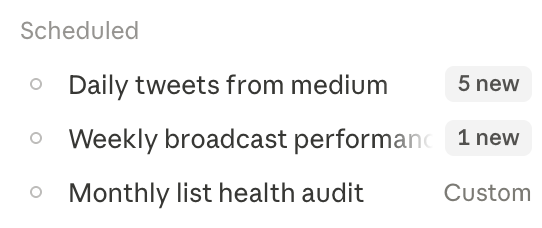
And here’s what I have set up in Claude Co-Work so far:
It’s using my Medium articles to give me bite-sized tweets (which I am yet to use).
It also checks the health of my newsletter audience so I can stop paying for subs that aren’t interested.
I discovered it last year thanks to one of my Authentic Influence (personal branding group coaching program) clients based out of the Bay Area.
While the graphics and templates are all good, what’s new to me is how insane their AI is.
You can
- Tell their AI what presentation you want, and it’ll build it in seconds!
- Copy-paste text and get an infographic
- Just tell them to create any image
It’s beautiful how flawlessly it works. You outsource the thinking to use it for creative stuff and just make edits.
4/ Google Interface
No fancy system for me as a solopreneur, I
- Use Google Sheets for data like my monthly finances, articles, etc
- I even stored my LinkedIn posts on Sheets during my maternity break
- Which was hyperlinked to Google Docs
- I use Google Drive for sharing videos and recordings
- Google Meet for all calls — it gets recorded and transcribed flawlessly
I’m a simple girl that way :))
Finally
The reason I outsource my work to these tools is so I can say no to most work and do what I genuinely enjoy doing — writing and creating.
I don’t want to waste time finding the right template and building a creative that takes hours.
I’ve built this life to do what I enjoy.
And so much has changed in the last 5 years of self-employment, especially with AI now.
All these tools have a free version, so I hope you can give them a try!
- Kit: for newsletters and powerful email marketing.
- Adobe Express: for visuals, photo editing, and AI-powered images.
- Claude: use the co-work and the chat feature.
- Google Drive: Sheets, Drive, and Docs are my system.
Let me know how you find it.
All the best!
Love,
N